Interaction
Conducting Traffic Stops
Enter Traffic Stop Mode, pull vehicles over safely, and handle the driver.
Traffic stops are one of the most common parts of police work. Traffic Stop Mode gives you the tools to pull a vehicle over safely, see its details at a glance, and handle the driver.
Entering Traffic Stop Mode
While looking at the vehicle in front of you, press Alt + E to enter Traffic Stop Mode. A panel appears showing details about the vehicle you intend to stop, including its license plate and options to help you pull it over.
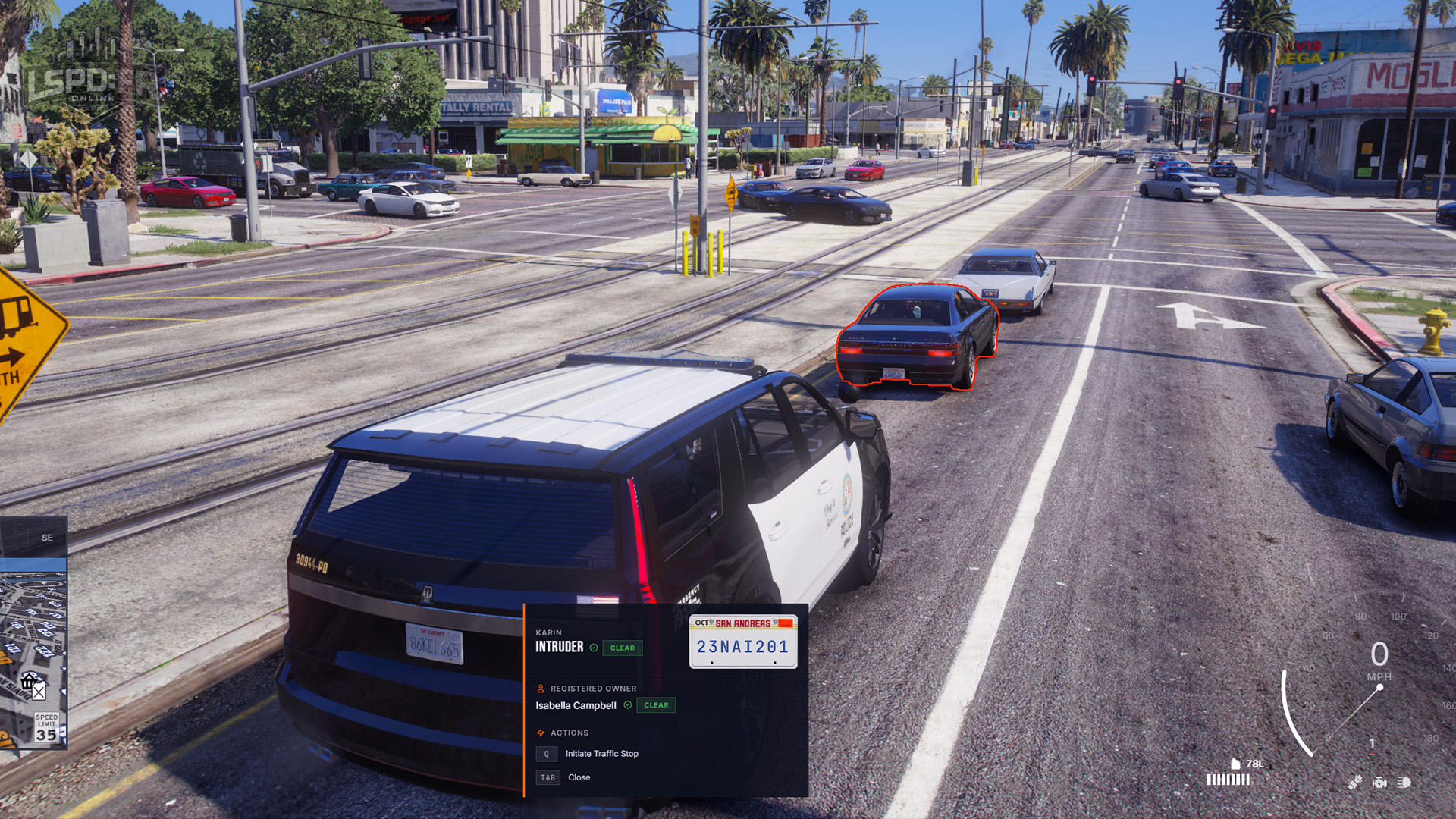
From here you can run a quick database lookup of the registration plate to find the registered owner, see any vehicle flags (such as being reported stolen), and be alerted to drivers without a proper license or with outstanding warrants.
Pulling a Vehicle Over
When it's time to pull over, switch on your emergency lights and wait for the driver to move to the side of the road.
Because some NPC drivers can be unpredictable, you can press the X key to set a safe pull-over destination. The driver will move to that point and come to a stop, so you don't interrupt the traffic behind you.
Safety Tips
- Always position your cruiser to protect the scene from passing traffic.
- Check the vehicle's flags before approaching — a stolen vehicle or a driver with warrants changes how you handle the stop.
- Call for backup from the Action Menu if anything looks high-risk.