Callouts
Responding to a Call
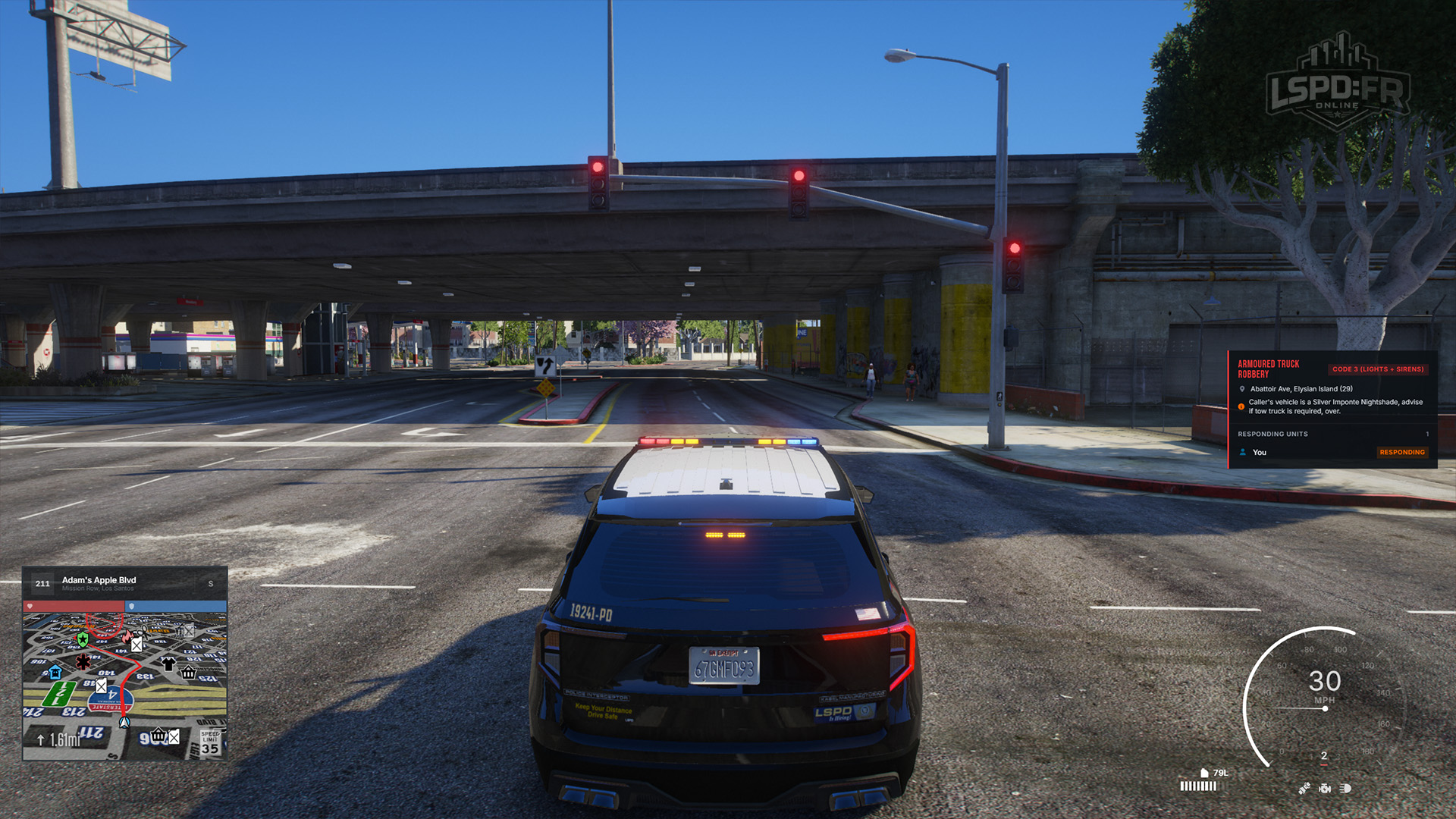
Track responding units and their live status as you head to the scene.
You're rarely working a call alone. Once you've accepted a callout, the panel on the right keeps you informed of every other officer attached to it and exactly what they're doing — so you always know who's on the way and who's already there.
The Responding Units List
After you accept a call, the callout panel updates to show you on the responding units list. This list updates live and displays every other player attached to the call alongside their current response status, giving you a real-time picture of the response as it develops.
Unit Statuses
Each unit on the list carries a status that tells you where they are in their response. Here's what each one means:
| Status | Meaning |
|---|---|
| Notified | They've received the call from dispatch but haven't yet pressed Y to accept it. |
| Responding | They've accepted the call and are en route to the scene. |
| On Scene | They've arrived at the scene. |
| Clearing | A unit who was attached to the call has marked themselves available again. They're clearing from the call and will disappear from the list shortly. |
| Unavailable | A unit was notified but didn't press Y in time. They're considered unavailable and will disappear from the list shortly. |
Keep half an eye on this list as you respond — it tells you whether you'll have support waiting when you arrive, or whether you're the first unit on scene.